Avara Homes / DESIGN & COMPONENTS
Avara Homes
Made of its own parts.
Draw the day before the walls. The programme sheet an architect fills in with a household before any plan: who lives here, which rooms must be close, which kept apart, and what happens through the day. Print paper, diazo ink and a roof-tile accent, with a vertical title block on every sheet.
01 / Palette & type
Print paper, diazo-purple ink and a roof-tile accent, borrowed from Indonesian drafting offices: sketches on orange millimetre block paper and diazo prints from tracing paper. Millimetre grid sits only behind drawings; relations read through symbols and line styles, never colour alone.
#f3eedb#2f2b78#a3401f#e4e0f0#e9a66fArchivo Expanded 600, a wide straight-boned grotesque like title-block and presentation lettering, sets the sheet titles and the AVARA wordmark. DM Sans carries room names, the day table, notes and controls.
02 / Composition & behavior
Every page is one sheet in a set: a 2px drawing border, the drawing field on the left and a 312px vertical title block on the right (project, household, scale, status, sheet index). On a phone the title block becomes a top strip with a scrollable sheet index.
No decorative motion. A changed relation redraws the bubble diagram at once and is announced; the light section changes only when a time of day is chosen.
The adjacency matrix is an ARIA grid: arrow keys move between pairs, Enter or Space changes a relation and the change is announced. The bubble diagram has an equivalent text list; schedule cells and patterns are labelled buttons; blocked or full storage is stated.
03 / Controls, including the edges
Every page is one sheet in a set: a 2px drawing border, the drawing field on the left and a 312px vertical title block on the right (project, household, scale, status, sheet index). On a phone the title block becomes a top strip with a scrollable sheet index.
Component inventory (scroll to inspect)
READ THE DESIGN
Why it is arranged this way.
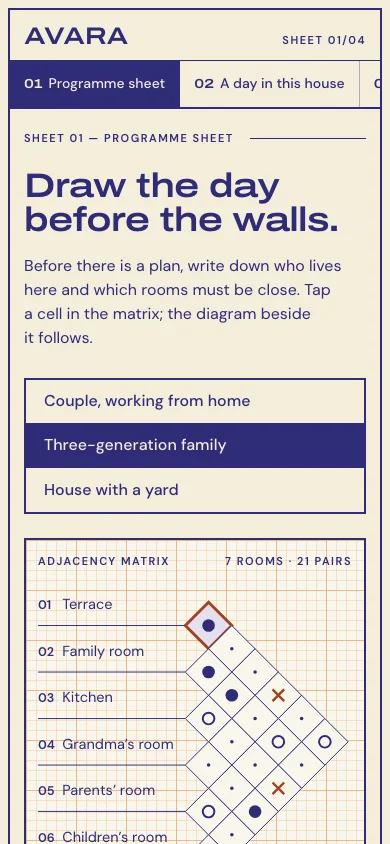
The capture shows the implemented opening. Notes connect its composition to the working experience and its mobile behavior.
- 01
Relations before rooms
The adjacency matrix leads the sheet. Each diamond is one pair of rooms; a tap or Enter changes it, and the bubble diagram beside it is redrawn from the same programme. Nothing is measured or to scale.
- 02
A title block, not a header
Project, household, scale, status and the sheet index sit in a vertical title block, as on a drawing set. On a phone it becomes a strip with the sheet index, followed at once by the sheet title.
- 03
Diazo ink on print paper
Purple ink, a roof-tile accent and tracing-paper panels come from Indonesian drafting offices. Millimetre grid sits only behind drawings; relations read through symbols and line styles, never colour alone.
04 / Form & feedback contract
A local preparation note. Try an empty submission, correct it, then export your actual input.
Your prepared note will appear here.
05 / Actual working components
Activate the full workspace when you want to inspect it. Its interaction code loads on demand.