Morrow Watch / DESIGN & COMPONENTS
Morrow Watch
Made of its own parts.
Configure a watch drawing and export its SVG. Watch concepts are discussed over drawings, so the drawing sheet is the whole site: a workshop nameplate, file tabs, the sheet with its configuration and drawing, and a title block that says what the drawing is not.
01 / Palette & type
Ink-blue ground, chalk drawing ink and brass for the chosen and the callouts; 1px rules frame the sheet, its tabs and the title block, and the drawing sits on a pale technical grid. Original vector geometry is the main subject; no photograph or optical glass.
#142a3d#f1f2e9#e7b66a#2b465bB612, drawn for aircraft instrument displays, sets the wordmark, the sheet titles, the combination and the object number like a drawing label. DM Sans carries the tabs, radios, callouts and notes. No monospace.
02 / Composition & behavior
Every page is one drawing sheet: the workshop nameplate with the document number, three file tabs (Working drawing, Strap silhouettes, Saved versions), the sheet head, a 290px configuration column beside the drawing field, and a title block across the sheet. On a phone it reads nameplate, tabs, title, choices and export, then the drawing and the title block.
A changed choice redraws the vector with a short slide; the layer study separates its layers on request. Reduced motion changes both without moving anything.
Real radios with local names and a ✓, file tabs as page links with the current page marked, a pressed detail lens and every change said in a status line. Visible focus, 44px targets, no state shown by colour alone, reduced motion.
03 / Controls, including the edges
Every page is one drawing sheet: the workshop nameplate with the document number, three file tabs (Working drawing, Strap silhouettes, Saved versions), the sheet head, a 290px configuration column beside the drawing field, and a title block across the sheet. On a phone it reads nameplate, tabs, title, choices and export, then the drawing and the title block.
Component inventory (scroll to inspect)
READ THE DESIGN
Why it is arranged this way.
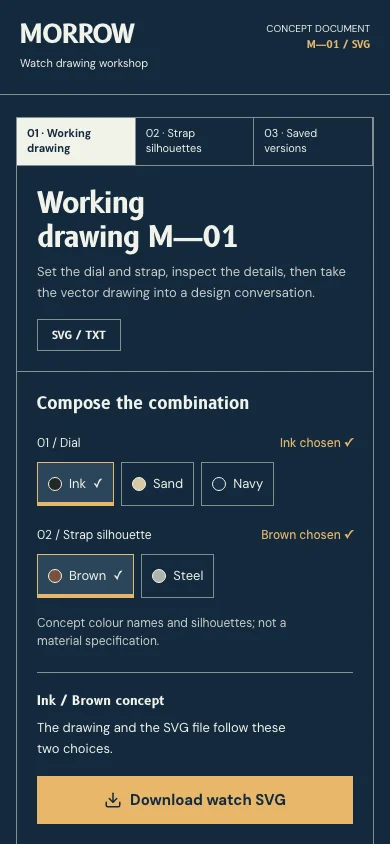
The capture shows the implemented opening. Notes connect its composition to the working experience and its mobile behavior.
- 01
The drawing is the opening
No slogan or hero: the first screen is sheet M—01 and its h1 is the drawing’s name. Real radios for the dial and strap sit beside the vector they change, with the SVG export under the status line.
- 02
File tabs, not chapters
Working drawing, Strap silhouettes and Saved versions are real page links hanging over the sheet; the open one is marked as the current page. On a phone the three share one row.
- 03
The sheet says what it is not
The head names the two files it gives (SVG / TXT); the title block across its foot names the object, the combination on the drawing and “Visual concept · not a manufacturing drawing”. 620 × 500 is the SVG canvas, never millimetres.
04 / Form & feedback contract
A local preparation note. Try an empty submission, correct it, then export your actual input.
Your prepared note will appear here.
05 / Actual working components
Activate the full workspace when you want to inspect it. Its interaction code loads on demand.