Pijar Academy / DESIGN & COMPONENTS
Pijar Academy
Made of its own parts.
Try one exercise first. Courses and small schools are judged by what learning there feels like, so the practice board is the whole site: a signboard on top, track tabs hanging from the board, a question, two versions and a stamp.
01 / Palette & type
Workshop yellow for the wall, the board’s cream, 2px slate-ink rules and a hard ink shadow; exercise drawings, the stamp and ticked items in green. A shield crest with a spark (✳, “pijar”) marks the school, the stamp and every completed exercise.
#f3ce58#203c4b#23624c#f9e7abLexend, drawn to make reading easier, sets the questions, the wordmark, the board’s headings and buttons. DM Sans reads the exercises, tabs, the programme sheet and the trial-class card. No monospace.
02 / Composition & behavior
Every page is one board in a classroom: the school’s signboard (crest, wordmark, chapters and a filled Trial class plate), the board with tabs hanging from its top edge and a note on the right, then a ruled foot. The opening sets the question left and versions A/B right, with three ways to join below. On a phone the signboard takes two rows and the board reads question, choices, check, result.
No motion library. After a right answer the stamp lands with a short scale, only when motion is allowed and the device is not constrained; reduced motion shows it still. The trial card’s slight tilt is static.
Real radios and checkboxes, pressed buttons for levels and tracks, a live count on the kit and every result said in a status line (the stamp is decoration). Visible focus, 44px targets, no state shown by colour alone, reduced motion.
03 / Controls, including the edges
Every page is one board in a classroom: the school’s signboard (crest, wordmark, chapters and a filled Trial class plate), the board with tabs hanging from its top edge and a note on the right, then a ruled foot. The opening sets the question left and versions A/B right, with three ways to join below. On a phone the signboard takes two rows and the board reads question, choices, check, result.
Component inventory (scroll to inspect)
READ THE DESIGN
Why it is arranged this way.
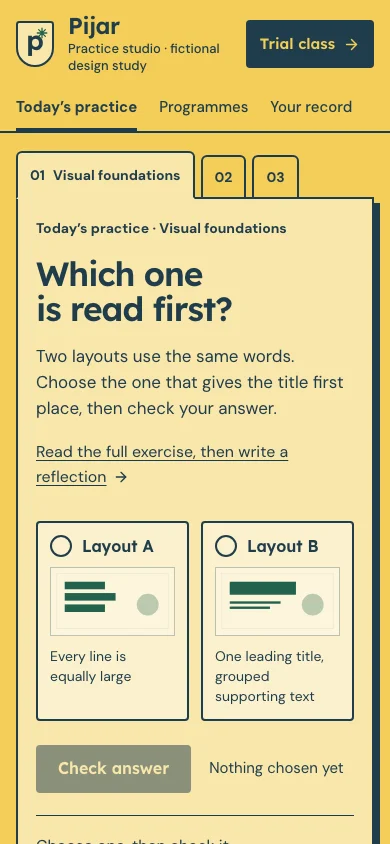
The capture shows the implemented opening. Notes connect its composition to the working experience and its mobile behavior.
- 01
The question is the headline
The first screen is today’s exercise, not a slogan: the question is the page’s h1, with the instruction and a link to the full exercise. The three tracks hang from the board as tabs; on a phone only the active one says its name.
- 02
Two versions, one stamp
Versions A and B are real radios drawn as cards. A right answer is written to the practice record and gets the teacher’s ✳ stamp; the result is said in a status line, and a wrong one gets a hint, not red.
- 03
A trial class, not enrolment
The filled plate on the signboard leads to the trial-class kit: four things to bring, a card that changes as they are ticked and a TXT note. No form, schedule, fee or personal data is sent.
04 / Form & feedback contract
A local preparation note. Try an empty submission, correct it, then export your actual input.
Your prepared note will appear here.
05 / Actual working components
Activate the full workspace when you want to inspect it. Its interaction code loads on demand.