s/d · THE STOCK BOOK & ITS SLIPS
Saku Dapur
The work behind a shop note, written as a workbook.
01 / FOUNDATIONS
Brick cover, ruled paper, clear figures.
Brick cloth, warm paper, brown ink and a green pencil mark. Straight rules organize the workbook instead of stacks of statistic cards. The 192px book index belongs to the desktop; on a phone its five work destinations become a bottom navigation. The detail slip has a firm brick top edge, not the storefront’s serrated receipt.
- Workbook paper
#f4eee3 - Brown ink
#302921 - Brick cover
#943e2c - Slip paper
#fffcf5 - Index tint
#f2d9c3 - Pencil green
#355b44
Chivo 700 writes the nameplate, sheet titles and counts; Chivo 400 carries table rows, labels and reading text. Both are static Latin WOFF2 files, one weight per file, with tabular figures. No simulated bold and no catalogue face inside the workbook.
| Role | Light | Dark |
|---|---|---|
| Ground | #f4eee3 | #201d19 |
| Paper / panel | #fffcf5 | #2d2822 |
| Ink | #302921 | #f4eee3 |
| Secondary text | #6b5d50 | #c4b59f |
| Brick signal | #943e2c | #f0aa8e |
| Index tint | #f2d9c3 | #483329 |
| Text pair | Light | Dark |
|---|---|---|
| Ink on ground / paper | 12.42 / 13.99:1 | 14.53 / 12.64:1 |
| Secondary on ground / paper | 5.50 / 6.20:1 | 8.36 / 7.27:1 |
| Signal on index tint | 5.19:1 | 6.09:1 |
02 / WORKFLOW
The source note stays intact.
The back of a small shop has a different rhythm from its shelf. A ruled stock book and the slips tucked between its pages become the interface: a numbered spine for navigation, a daily sheet for counts, a table of incoming notes and a drawer that keeps each original snapshot intact. Toko Saku prepares the sample; Saku Dapur records the local work around it.
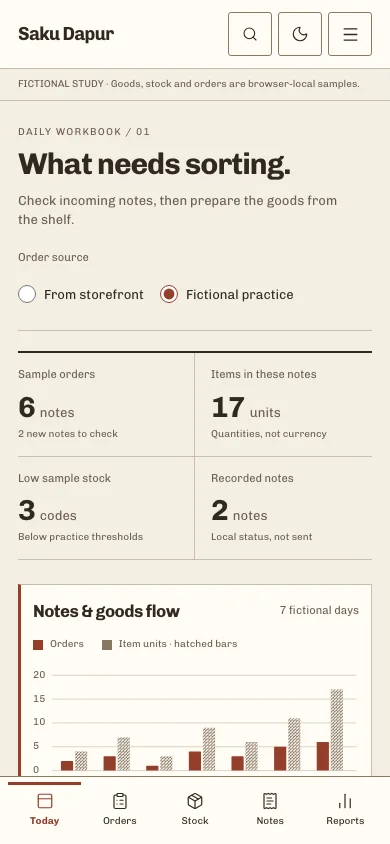
Book index, a compact shop header, the fictional-study line, then the task sheet. A ruled count strip precedes paired bars, the stock check and the incoming-note table. Orders open in a 440px right drawer; on a phone it becomes a full sheet. Search, page selection and task actions remain separate controls.
- Save a sample note in Toko Saku, on this browser and origin, or explicitly choose fictional practice data.
- Inspect the snapshot, then record local stages: New → Checked → Preparing → Ready to record → Recorded.
- Adjust practice stock only through its validated form. A note stage never deducts stock.
Native tables retain captions and sortable headings; selection names its scope. The command palette supports Command/Control K, arrows and Enter. Detail dialogs preserve scope, trap focus and return it after Escape. Forms focus the first invalid field, feedback stays until dismissed, every state has words as well as colour, and both colour modes keep readable text.
A drawer transition explains where the slip came from; a changed row marks the local update. Optimistic changes roll back when browser storage refuses them. Loading placeholders do not pretend to fetch a server. Reduced motion removes sliding and shimmer while preserving every status message.
Your brand changes the name, logo and mapped ink/signal through the existing Customize panel. Paper, type, structure and fictional limits remain authored; additional surfaces and portals recheck contrast in both modes.
03 / LIMITS & PROVENANCE
A fictional shop workbook.
Static bilingual App Router pages with browser-only validated data. Toko Saku’s collection-umkm-orders-v1 is read through its existing decoder and never written here. A separate 32KiB workbook keeps local progress and at most 60 stock adjustments; preferences have their own 2KiB key. The six practice notes are enabled explicitly and never mixed with storefront records.
Fictional design study, not an operational ERP. No real customers, prices, payments, deliveries or available stock. Local storage has no cross-tab transaction or server sync; exports remain fictional and are not proof of payment.
The stock book, mark, chart and slips were made for this study. Toko Saku supplies its six illustrative catalogue items and the read-only v1 order contract. No reference dashboard, photograph, client or operating business is claimed.
Chivo 400/700 are self-hosted static Latin WOFF2 files under OFL 1.1, with no declared Reserved Font Name. Their SHA-256 and pinned source URLs were checked against the approved proposal; Anybody remains an unused fallback. Read Chivo’s license
04 / ACTUAL CAPTURE
The implemented daily sheet.
05 / Actual working components
Activate the full workspace when you want to inspect it. Its interaction code loads on demand.