Sapa / DESIGN & COMPONENTS
Sapa
Made of its own parts.
Hand over a card. A small trade is often met through a printed business card passed across the counter; Sapa makes that card the page. Its front carries the name, the trade and three contact lines inside a stitched edge; its back is a QR code of the page itself. Under it sit the trade’s own links and a table of hours that says whether the stall is open now — not an imitation social profile.
01 / Palette & type
Plum ink and a mulberry thread on warm card stock: the card face is a shade lighter than the page, with a 1.75:1 printed-card ratio, a dashed stitch inside its edge and a needle-and-thread mark. Links are framed rows, the hours a ruled table; mulberry marks the main action, the stitch and today.
#f3eee7#3b1d3f#9e2f65#e6d6e0#fffdf9#6b5a6dHanken Grotesk 700, a compact neutral grotesque like the lettering of a printed card, sets the name, the section titles and the sign, so any visitor’s name still reads. DM Sans carries contact lines, links, hours and buttons with tabular figures. Schibsted Grotesk 700 stays an unused recorded fallback.
02 / Composition & behavior
One page. On wide screens the card and its two actions sit left, the links and the hours right. On a phone it reads card → actions → links → hours, with nothing to swipe sideways. Without JavaScript both sides of the card follow each other, the back as the page address in text.
The card leans toward the pointer or a finger (at most 8°) and settles back when released; Flip card turns it once to the QR side. The thread of the mark is sewn once as the page loads. With reduced motion the card stays flat, flips without turning and the mark appears whole.
Flip card is a toggle button with aria-pressed; both sides stay in the reading order. The QR has a text alternative and the address beside it, so nothing depends on scanning. Links say where they go or that they are not linked; the open-now line is a polite status; today’s row is named in words, not colour.
03 / Controls, including the edges
One page. On wide screens the card and its two actions sit left, the links and the hours right. On a phone it reads card → actions → links → hours, with nothing to swipe sideways. Without JavaScript both sides of the card follow each other, the back as the page address in text.
Component inventory (scroll to inspect)
READ THE DESIGN
Why it is arranged this way.
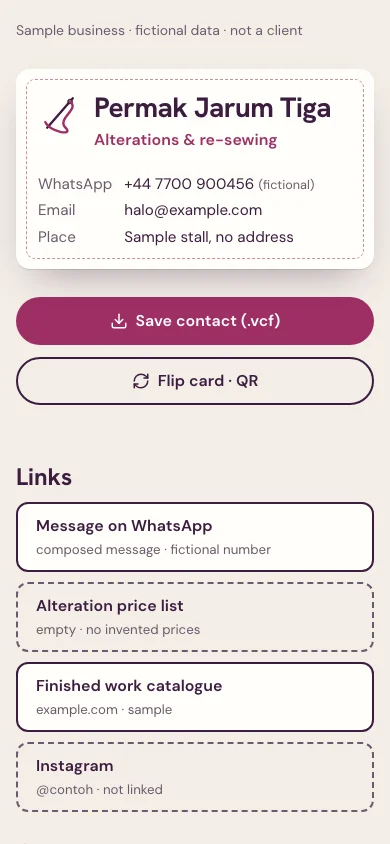
The capture shows the implemented opening. Notes connect its composition to the working experience and its mobile behavior.
- 01
The card is the page
A printed card’s 1.75:1 face with a stitched edge carries the name, the trade and three contact lines — not an imitation social profile. A visitor’s name and logo replace the sample’s; the contact lines stay labelled samples.
- 02
Its back is this page
Flip card turns it to a QR code made in the browser from the page address, with the address in text beside it. The card leans toward a pointer or finger and stays flat under reduced motion.
- 03
Links say where they go
Each framed row names its destination or says it is not linked; the price list is left empty rather than invented. The hours table says in words whether the stall is open now, from Jakarta time.
04 / Form & feedback contract
A local preparation note. Try an empty submission, correct it, then export your actual input.
Your prepared note will appear here.
05 / Actual working components
Activate the full workspace when you want to inspect it. Its interaction code loads on demand.