twc-026 / A study by Syafril · not client work

Toko Saku: Toko Saku

A fictional small shop of everyday goods whose site is a shelf and a note: six illustrated items, a note of what you picked and how many, and one message that asks the seller for price and availability. No prices, no checkout and no payment; the destination number is fictional.

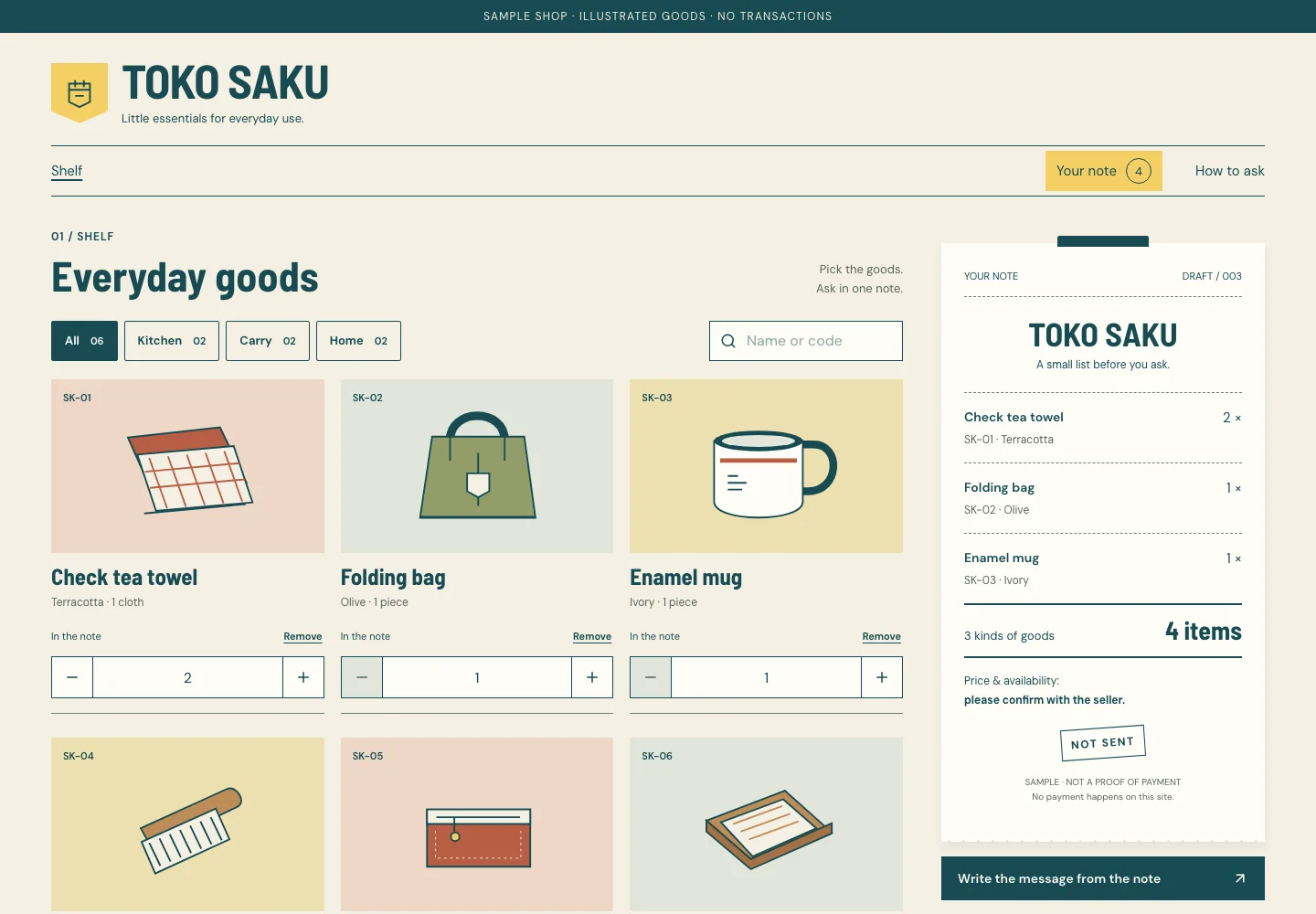
Actual desktop capture of the Toko Saku demonstration.

READ THE DESIGN

Why it is arranged this way.

The capture shows the implemented opening. Notes connect its composition to the working experience and its mobile behavior.

Actual website capture. Follow the numbered notes.
  1. 01

    The shelf is the opening

    No hero or slogan before the goods: the nameplate and one demo line, then the h1 names the shelf, with categories as pressed buttons and a labelled search. Every card shows its item code, variant and unit — the same facts the note and the message carry.

  2. 02

    Three controls, never a hidden remove

    Once a good is in the note its card shows minus, a number field and plus, 44px each. Minus is disabled at one; removing is its own named button with one undo. A typed number is checked on leaving the field, and the note keeps the last valid count.

  3. 03

    A note that is never “sent”

    Beside the shelf the note counts kinds and items, never money, and its stamp always says not sent; changes are said once near it. On a phone the yellow way to the note stays in the page bar at the top while scrolling.

At a glance

Headline type
Barlow Semi Condensed
Reading type
DM Sans
Try this interaction
Shelf and quantities, a note, one message to copy, download or open
Note paper#f5f0e3
Petrol ink#174b52
Shop yellow#f3cf63
Item ground#e0e5db
Receipt white#fffdf6
A schematic of the implemented composition.

WHAT IS HERE / WHAT COMES NEXT

Know what you are choosing.

Show the goods, then let the chat do the selling.

Working in this demo

  • Add from the shelf or a product page; the same item merges into its line
  • Quantities 1–99 by button or typing, checked on leaving the field
  • Remove with undo, clear all with confirmation
  • Copy the message, download the note as TXT, open a sample link to a fictional number
  • Save a sample order once per version of the note, up to 20 in this browser
  • Blocked, full, damaged or expired storage is stated; the note still works on the page

This tool includes a working workspace and its own component book. Its controls operate on local state.
Production integrations to discuss

  • A real shop’s goods, photographs, prices and stock, its own WhatsApp number and any payment, delivery or order system need a separately agreed implementation.

Exports are generated in your browser. No account, cloud storage or external service is connected.

A limit to plan around

Fictional design study. Toko Saku has no address, hours, prices, stock or customers; its goods are drawings, its number belongs to a range kept for drama and takes no orders, nothing is sent, and sample orders stay in one browser.

Delivery & customization

Page scope, brand assets, content, handover, hosting, costs and support are discussed in a consultation before work begins. The demo is a reference for that conversation.

Prepare a brief for this direction

The idea

Ask before you pay. A small shop that sells over chat does not need a checkout; it needs a clear list to ask about. Toko Saku makes the shop’s note the interface: a pocket mark and a counter nameplate, a shelf of goods with item codes, and a narrow note with dashed rules that counts kinds and items — never money — and becomes one message. The note always says it is not sent and not a proof of payment.

Visual language

Warm note paper, petrol ink and a yellow shop label, like a counter pad and its price tags without the prices. Square corners, 1px rules and a 2px rule around the count, dashed lines between items and a serrated foot on the note. Six flat drawings made for this shop on peach, butter and sage grounds. Yellow marks the way to the note, never a control by colour alone.

Typography

Barlow Semi Condensed 700, dense like a shop’s nameplate and its labels on a narrow strip, sets the wordmark, titles, product names and the item count. DM Sans carries the note’s lines, labels, buttons and the message; counts use tabular figures.

Layout & composition

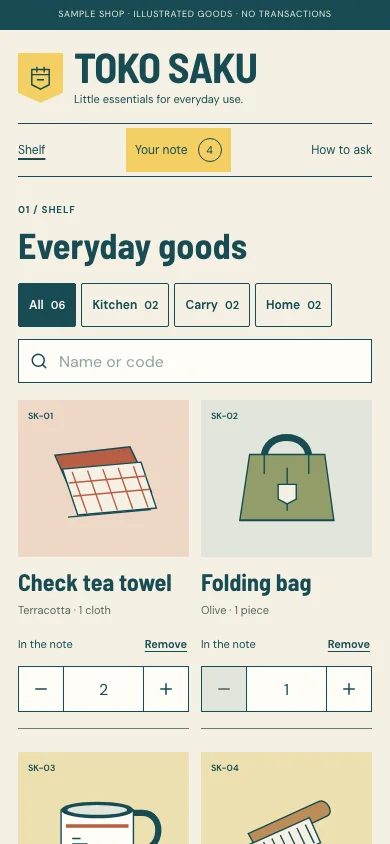
A thin demo line, the nameplate, then a page bar with the way to the note that stays at the top while scrolling. On wide screens three columns of goods sit beside a narrow note; the note page sets the editable note left and the message right. On a phone the goods take two columns and the note follows them; its page reads note → message → copy and download → link → save, with the message folded.

Motion & interaction

Almost none: a line that changed is marked briefly and the note never scrolls itself. No confetti, no counters rolling; reduced motion removes the mark’s transition.

Under the surface

Static bilingual Next.js pages; the goods and their detail pages are prerendered. The cart — IDs and quantities only — stays in this browser for seven days, size-checked and validated with Zod on every read; names always come from the catalogue. The message, its TXT and the click-to-chat link come from one pure serializer. An explicit “save as sample order” writes a bilingual, price-less snapshot to a shared browser key that a later back-office can read. No account, payment, stock or server.

Designed for everyone

Categories are pressed buttons and the search has a label and a clear button. Each quantity is three separate controls — minus, a labelled number field and plus, 44px each — and minus is disabled at one rather than removing; removing is its own named button with a one-step undo. Changes are announced by one status line near the note, without moving focus. The message preview is a native disclosure; copy says “copied” only after the browser confirms.

Inside the experience

  • Shelf of six illustrated goods with categories and search
  • Separate minus, number and plus controls; 1–99 per item, up to 12 lines
  • A note that counts kinds and items, never money, and is never “sent”
  • One message: preview, copy, TXT and a sample WhatsApp link
  • Sample orders saved for a later back-office
  • Own component and state book; local brand personalization

A good fit for

  • Small shops and home businesses that introduce their goods in a simple catalogue and agree on price and delivery in a chat — before any online checkout exists.

Across screens

Actual desktop capture of the Toko Saku demonstration.
Actual mobile capture of the Toko Saku demonstration.

A different perspective