twc-016 / A study by Syafril · not client work

Morrow Watch: Morrow Watch

A fictional watch drawing workshop whose site is one drawing sheet, M—01. The first screen is the working drawing: real radios for three dials and two strap silhouettes beside the original vector they change, a detail lens and the SVG it exports. File tabs lead to the two silhouettes under one dial and to a saved version with its SVG and TXT notes.

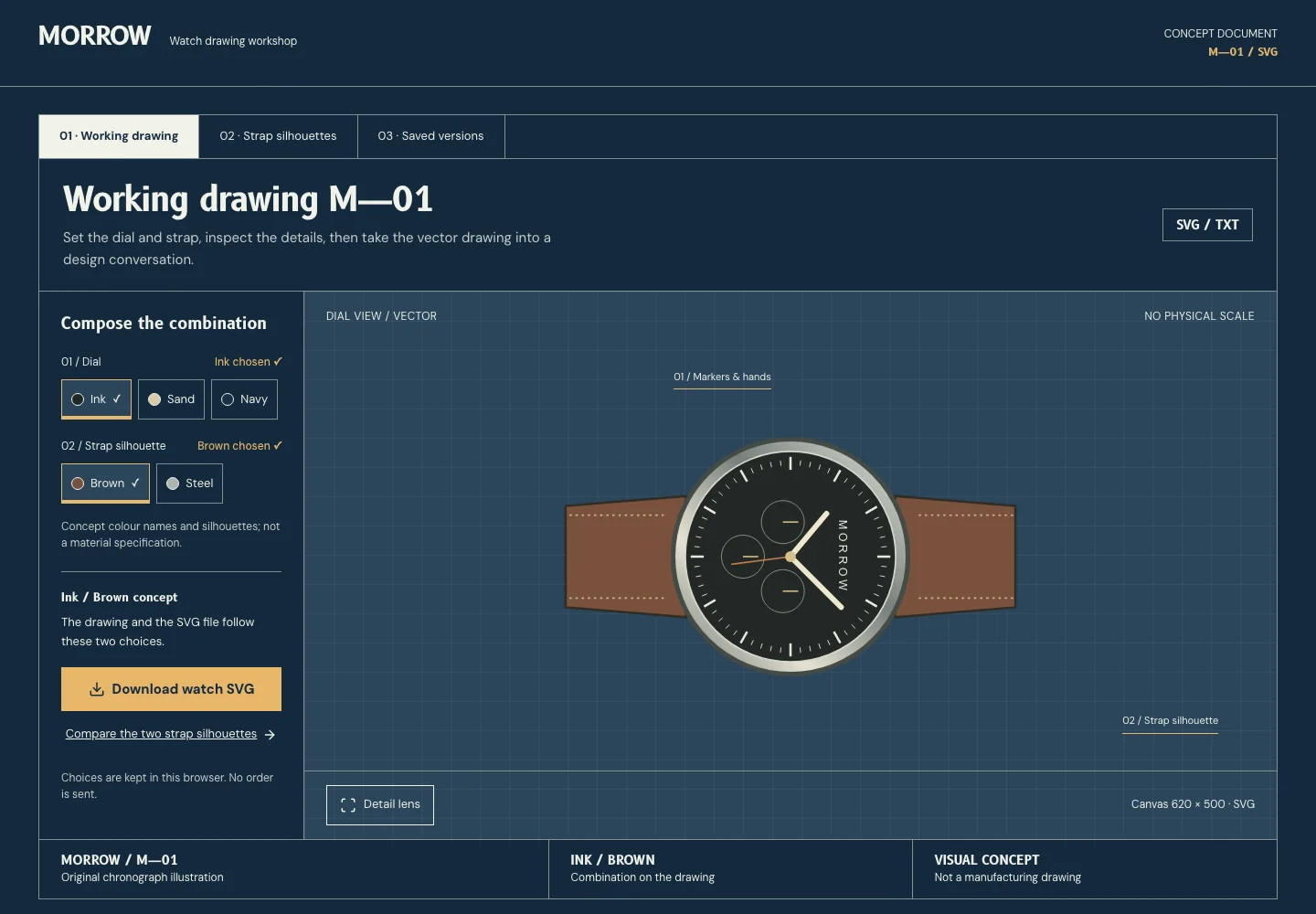
Actual desktop capture of the Morrow Watch demonstration.

READ THE DESIGN

Why it is arranged this way.

The capture shows the implemented opening. Notes connect its composition to the working experience and its mobile behavior.

Actual website capture. Follow the numbered notes.
  1. 01

    The drawing is the opening

    No slogan or hero: the first screen is sheet M—01 and its h1 is the drawing’s name. Real radios for the dial and strap sit beside the vector they change, with the SVG export under the status line.

  2. 02

    File tabs, not chapters

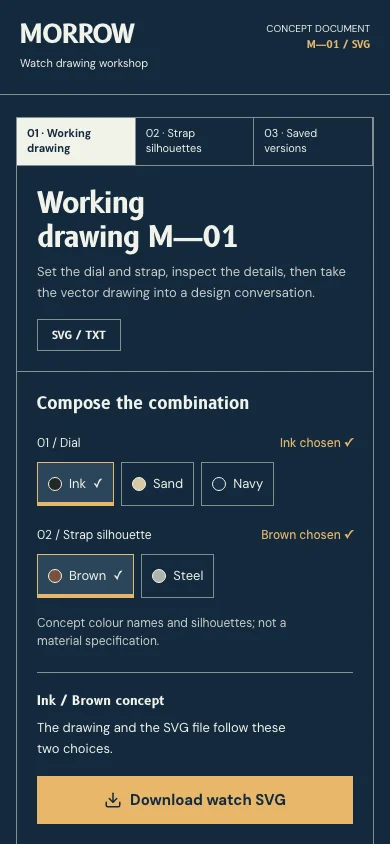
    Working drawing, Strap silhouettes and Saved versions are real page links hanging over the sheet; the open one is marked as the current page. On a phone the three share one row.

  3. 03

    The sheet says what it is not

    The head names the two files it gives (SVG / TXT); the title block across its foot names the object, the combination on the drawing and “Visual concept · not a manufacturing drawing”. 620 × 500 is the SVG canvas, never millimetres.

At a glance

Headline type
B612
Reading type
DM Sans
Try this interaction
Drawing sheet M—01: dial and strap radios beside the vector they export
Ground#142a3d
Ink#f1f2e9
Signal#e7b66a
Supporting surface#2b465b
A schematic of the implemented composition.

WHAT IS HERE / WHAT COMES NEXT

Know what you are choosing.

A concept drawing to configure, compare and take into a design conversation.

Working in this demo

  • Dial and strap radios with a matching SVG export
  • Two strap silhouettes under one dial
  • One saved version with restore and TXT notes in this browser
  • Detail lens and layer study
  • Original watch geometry

This tool includes a working workspace and its own component book. Its controls operate on local state.
Production integrations to discuss

  • Real business information, licensed brand assets and any account, booking or transaction service need a separately agreed implementation.

Exports are generated in your browser. No account, cloud storage or external service is connected.

A limit to plan around

Fictional design study. The drawing is a visual concept with no physical scale, not a manufacturing drawing; colours and silhouettes specify no material, and exports remain local planning artifacts.

Delivery & customization

Page scope, brand assets, content, handover, hosting, costs and support are discussed in a consultation before work begins. The demo is a reference for that conversation.

Prepare a brief for this direction

The idea

Configure a watch drawing and export its SVG. Watch concepts are discussed over drawings, so the drawing sheet is the whole site: a workshop nameplate, file tabs, the sheet with its configuration and drawing, and a title block that says what the drawing is not.

Visual language

Ink-blue ground, chalk drawing ink and brass for the chosen and the callouts; 1px rules frame the sheet, its tabs and the title block, and the drawing sits on a pale technical grid. Original vector geometry is the main subject; no photograph or optical glass.

Typography

B612, drawn for aircraft instrument displays, sets the wordmark, the sheet titles, the combination and the object number like a drawing label. DM Sans carries the tabs, radios, callouts and notes. No monospace.

Layout & composition

Every page is one drawing sheet: the workshop nameplate with the document number, three file tabs (Working drawing, Strap silhouettes, Saved versions), the sheet head, a 290px configuration column beside the drawing field, and a title block across the sheet. On a phone it reads nameplate, tabs, title, choices and export, then the drawing and the title block.

Motion & interaction

A changed choice redraws the vector with a short slide; the layer study separates its layers on request. Reduced motion changes both without moving anything.

Under the surface

Static bilingual Next.js pages with one validated browser draft (combination and saved version), explicit SVG and TXT exports and independently scoped components. No account, external submission or production transaction.

Designed for everyone

Real radios with local names and a ✓, file tabs as page links with the current page marked, a pressed detail lens and every change said in a status line. Visible focus, 44px targets, no state shown by colour alone, reduced motion.

Inside the experience

  • Working drawing with real dial and strap radios
  • Matching SVG export of the active combination
  • Two strap silhouettes under one dial
  • Saved version with restore and TXT notes
  • Detail lens and layer study
  • Own component and state book
  • Local brand personalization

A good fit for

  • Independent watch and accessory designers presenting a concept drawing.
  • Their collaborators: people who want to try combinations and take the drawing into a design conversation.

Across screens

Actual desktop capture of the Morrow Watch demonstration.
Actual mobile capture of the Morrow Watch demonstration.

A different perspective