twc-018 / A study by Syafril · not client work

Pijar Academy: Pijar Academy

A small fictional practice studio whose site is its classroom board. The first screen is today’s exercise: choose version A or B, check it, and a teacher’s ✳ stamp marks a right answer. Three levels of experience run across three tracks, and a trial-class page builds the card a visitor takes along.

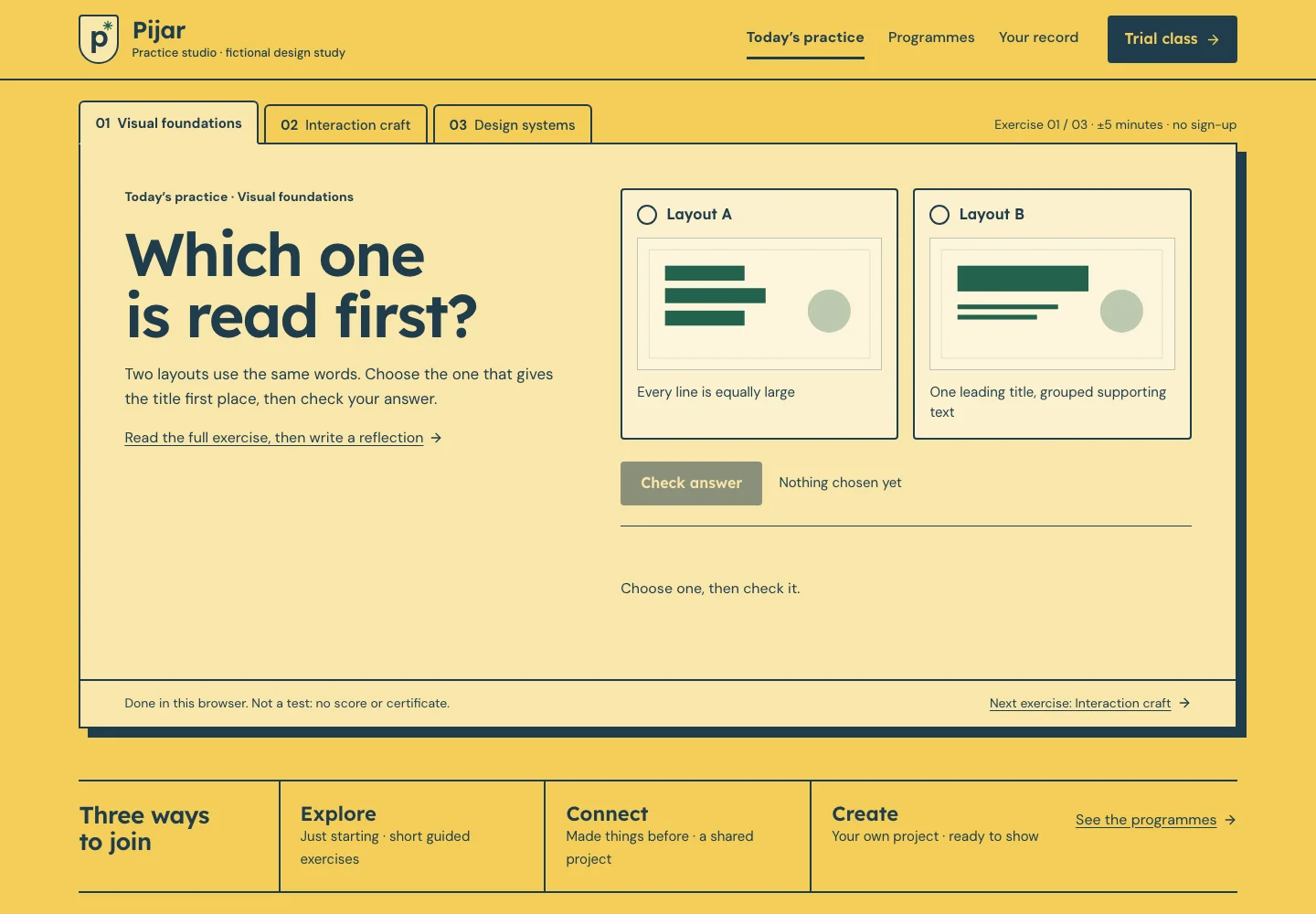
Actual desktop capture of the Pijar Academy demonstration.

READ THE DESIGN

Why it is arranged this way.

The capture shows the implemented opening. Notes connect its composition to the working experience and its mobile behavior.

Actual website capture. Follow the numbered notes.
  1. 01

    The question is the headline

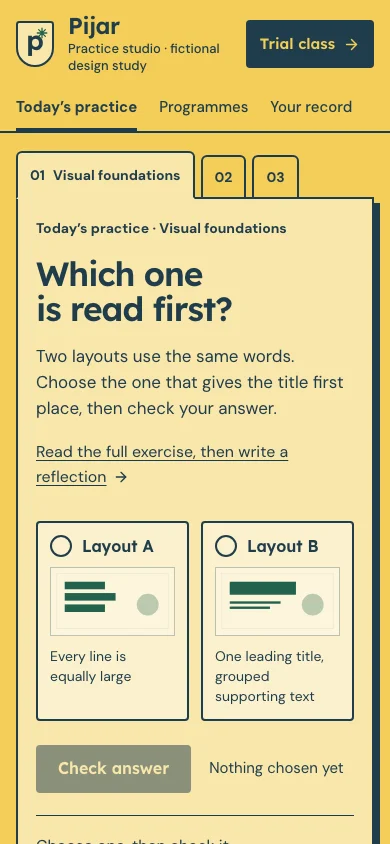
    The first screen is today’s exercise, not a slogan: the question is the page’s h1, with the instruction and a link to the full exercise. The three tracks hang from the board as tabs; on a phone only the active one says its name.

  2. 02

    Two versions, one stamp

    Versions A and B are real radios drawn as cards. A right answer is written to the practice record and gets the teacher’s ✳ stamp; the result is said in a status line, and a wrong one gets a hint, not red.

  3. 03

    A trial class, not enrolment

    The filled plate on the signboard leads to the trial-class kit: four things to bring, a card that changes as they are ticked and a TXT note. No form, schedule, fee or personal data is sent.

At a glance

Headline type
Lexend
Reading type
DM Sans
Try this interaction
Practice board with checked answers
Ground#f3ce58
Ink#203c4b
Signal#23624c
Supporting surface#f9e7ab
A schematic of the implemented composition.

WHAT IS HERE / WHAT COMES NEXT

Know what you are choosing.

Try one exercise first.

Working in this demo

  • Three introductory exercises with checked answers, shared by the opening and the full exercise
  • Level and track pickers with an authored sample programme for each pair
  • Learning-plan and trial-class TXT downloads
  • Practice record and trial-class kit kept in this browser, validated on every read

This tool includes a working workspace and its own component book. Its controls operate on local state.
Production integrations to discuss

  • Real programme information, admission policy, schedules and fees, licensed brand assets and any enquiry, booking or payment service need a separately agreed implementation.

Exports are generated in your browser. No account, cloud storage or external service is connected.

A limit to plan around

Fictional design study. Exercises, levels and meeting counts are illustrative; there is no schedule, fee, accreditation or enrolment, and exports remain local planning artifacts.

Delivery & customization

Page scope, brand assets, content, handover, hosting, costs and support are discussed in a consultation before work begins. The demo is a reference for that conversation.

Prepare a brief for this direction

The idea

Try one exercise first. Courses and small schools are judged by what learning there feels like, so the practice board is the whole site: a signboard on top, track tabs hanging from the board, a question, two versions and a stamp.

Visual language

Workshop yellow for the wall, the board’s cream, 2px slate-ink rules and a hard ink shadow; exercise drawings, the stamp and ticked items in green. A shield crest with a spark (✳, “pijar”) marks the school, the stamp and every completed exercise.

Typography

Lexend, drawn to make reading easier, sets the questions, the wordmark, the board’s headings and buttons. DM Sans reads the exercises, tabs, the programme sheet and the trial-class card. No monospace.

Layout & composition

Every page is one board in a classroom: the school’s signboard (crest, wordmark, chapters and a filled Trial class plate), the board with tabs hanging from its top edge and a note on the right, then a ruled foot. The opening sets the question left and versions A/B right, with three ways to join below. On a phone the signboard takes two rows and the board reads question, choices, check, result.

Motion & interaction

No motion library. After a right answer the stamp lands with a short scale, only when motion is allowed and the device is not constrained; reduced motion shows it still. The trial card’s slight tilt is static.

Under the surface

Static bilingual Next.js pages with two validated browser drafts (practice record and trial-class kit), explicit TXT exports and independently scoped components. No account, external submission or production transaction.

Designed for everyone

Real radios and checkboxes, pressed buttons for levels and tracks, a live count on the kit and every result said in a status line (the stamp is decoration). Visible focus, 44px targets, no state shown by colour alone, reduced motion.

Inside the experience

  • Today’s exercise on the first screen: two versions, a checked answer and a ✳ stamp
  • Three levels of experience across three tracks, with a learning-plan download
  • Trial-class kit: a four-item checklist, a card that changes with it and a TXT note
  • Practice record with browser-local reflections
  • Own component and state book
  • Local brand personalization

A good fit for

  • Course and tutoring centres, art and design studios, small non-formal schools and independent teachers.
  • Their visitors: future students and families who want to know what learning there feels like and what to bring.

Across screens

Actual desktop capture of the Pijar Academy demonstration.
Actual mobile capture of the Pijar Academy demonstration.

A different perspective